08 June 2010

0 Canon Legria

Canon Legria HF M31 Review
After setting the standard for premium HD camcorders in 2008 with the HF10 and its derivatives, Canon’s 2009 models didn’t quite whet our appetites so much. But the company doesn’t rest on its laurels, and 2010 has scarcely begun before we’re seeing the first examples of the next generation trickle through. First to reach TrustedReviews is the mid-range Legria HF M31, top of a trio of siblings which includes the HF M36 and HF M306. 


The HF M31 is essentially another enhancement of the Legria HF20 and HF21. Like the latter, it relies on a 1/4in CMOS sensor with a gross 3.89-megapixels, uses a Canon HD lens with the same specifications, provides a 15x optical zoom, and integrates an identical DIGIC DV III image processor. The HF M31 has 32MB of flash memory built in, which is enough for three hours of footage at the top quality mode. This shoots Full HD resolution AVCHD at the maximum possible 24Mbits/sec data rate. The HF M31 also sports a slot for SD memory, should you need more storage. So in this respect it’s identical to the HF20. 


The biggest news is not the core specifications, then. What has changed is the control interface. With the HF M31, Canon has followed Sony and Panasonic and switched to a touchscreen LCD. In regular shooting mode, there are three onscreen buttons. One simply switches between camcorder and camera modes. The other enables onscreen buttons for operating the zoom and toggling recording, so you can use the camcorder two-handed from a more waist-oriented position.


The final FUNC button calls up the camcorders settings, and this menu has been totally redesigned from previous Canon camcorders for easier touchscreen operation. The initial screen presents just 12 options in two screens, which you can switch between with a finger flick across the screen, in a similar fashion to an Apple iPhone’s main app interface. 

The first screen provides access to focusing, white balance, exposure, mic level, program modes, and the full menu. The second screen offers controls for zoom, AGC, the video light, the Pre REC function, digital effects and image stabiliser settings. Although most of these operate in the same way as with other Canon camcorders, there are some new additions. The focus and exposure options take full advantage of the touchscreen, providing one-touch operation where you simply indicate which point within the frame you would like to use as reference. However, Canon doesn’t provide the facility to combine the two into a single action, unlike Sony and Panasonic. You can also operate both with onscreen sliders, if you prefer. 

21 May 2010

0 Don't Worry, This Baby Is Just Learning

Baby Learning


Babies do a lot of sleeping—sometimes up to 18 hours a day. And with the remaining six hours dedicated to pooping and crying, you have to wonder when these tater tots are actually learning. The answer: sleep multitasking.

In a new study published in the Proceedings of the National Academy of Sciences, scientists observed that babies are masters of a skill that I've been working on since high school: learning while sleeping. LiveScience explains the experiment (and assures us that the baby above is not being attacked by some sort of terrifying robo-octopus):
In experiments with 26 sleeping infants, each just one to two days old, scientists played a musical tone followed by a puff of air to their eyes 200 times over the course of a half-hour. A network of 124 electrodes stuck on the scalp and face of each baby also recorded brain activity during the experiments.
The babies rapidly learned that they could expect a puff of air upon hearing the tone, showing a four-fold increase on average in the chances of tightening their eyelids in response to the sound by the end of each session.
In addition to these new insights into how babies' brains work, researchers hope that their success in scanning the infants' tiny cerebella might lead to new techniques for identifying autism and dyslexia at a young age.

As William Fifer, a developmental neuroscientist at Columbia University, explained, "babies spend so much time asleep...[it] could be an ideal time and state to ask questions of their brain." Then he referred to the baby as a "data sponge," I went back to thinking of them as cute little blobs and not scientific subjects, and all was right with the universe. [LiveScience via Geekologie]

12 May 2010

0 Hardisk rosak atau lama banyak rahsia

 Tahukah anda bahawa hard disk anda yang sudah rosak samada daripada PC anda atau mesin fotostat di kedai menyimpan data yang terlalu berharga dan merbahaya kerana banyak rahsia?Hardisk yang rosak dan dibuang masih boleh dibuka dan dibaca semula oleh pakar. Saya pernah terbaca satu berita akhbar dari Los Angeles 3-4 tahun lalu melaporkan satu warehouse yang membeli hardisk lama atau hard disk rosak dan kemudian memulihkan hard disk berkenaan dan dapat membaca semula data yang terkandung dalamnya. Data ini termasuk ribuan foto, video, dokumen (sulit dan umum), no. kad kredit, no akaun bank. password dan 1001 macam lagi maklumat peribadi.

Adakah anda akan buang hard disk rosak anda begitu sahaja?

 
Bagaimana anda musnahkan hard disk anda? Cuba lihat youtube ini


Nearly every digital copier built since 2002 contains a hard drive - like the one on your personal computer - storing an image of every document copied, scanned, or emailed by the machine.

In the process, it's turned an office staple into a digital time-bomb packed with highly-personal or sensitive data. If you're in the identity theft business it seems this would be a pot of gold.

"The type of information we see on these machines with the social security numbers, birth certificates, bank records, income tax forms," John Juntunen said, "that information would be very valuable."

07 May 2010

0 Skype to roll out five way video calling next week

Skype to Launch Group Video Calling Feature Next Week


If you haven’t already heard, starting from next week, Skype users will be able to make video calls with up to 5 people at a time. The new Group Video Calling feature will be released in beta next week and will be free. But don’t be too happy yet though because starting from next year, Skype plans to start charging for this new service; well, at least for now, you can easily set up a video conference at no charge at all. Additionally, Skype will also be rolling out new call plans to more than 170 countries, offering a much better and cheaper deal compared to the current Pay As You Go rates.

0 MicroSIM

How to Modify Your Own MicroSIM


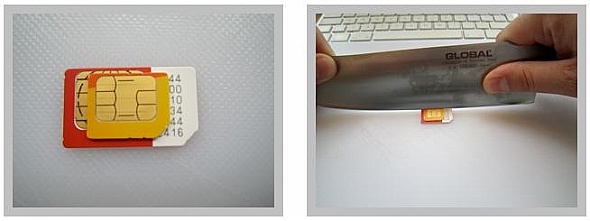
If you’ve ever had thoughts about asking your friend to get you an iPad 3G from the U.S. but are worried that you can’t use it because it runs on a micro SIM, then fret no more, because there’s now a guideline how to modify your own SIM card. It looks pretty simple, all you have to do is start cutting – you even have to cut the contacts on your original SIM card so it matches with a MicroSIM. Unfortunately though, if your friend is kind enough to ship over an iPad for you, you should probably ask for a MicroSIM as a sample. But be careful, last I heard, it costs quite a lot to replace a SIM card here in Malaysia, so please modify with care. Visit this site for the complete guideline.

01 May 2010

0 Xbox 360 120GB Elite

Product summary

The good: Excellent selection of games, including many 360-only exclusives; all games are in native high-definition; user-friendly Dashboard interface; supports wireless controllers and accessories; Xbox Live service offers online multiplayer (with matchmaking and voice chat) and content downloads for most games; backward compatible with many--but not all--original Xbox titles; doubles as a superior digital media hub and Windows Media extender; online Marketplace allows easy purchases of minigames, add-on gaming content, high-def movies, and TV shows.
The bad: The Elite fails to correct most of the annoyances of the original 360 version: the noisy DVD drive and cooling fan; a gigantic, oversize power supply; no built-in wireless networking; only three USB ports; a substandard DVD player; online gaming requires a paid subscription to Xbox Live; proprietary wireless format limits third-party accessories.
The bottom line: While it's neither a must-have upgrade for existing 360 owners nor as feature-packed as the PS3, the Xbox 360 Elite's combination of top-notch gaming and digital media features make it the current game console of choice.

27 April 2010

0 Black Berry Bold 9700

Product summary

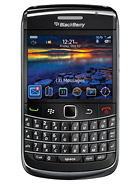
The good: The BlackBerry Bold 9700 boasts a sleeker design that includes an optical trackpad, a 3.5mm headphone jack, and a brilliant display. The smartphone is 3G capable and offers Wi-Fi with UMA support, Bluetooth, and GPS. It also gets a faster processor and updates to BlackBerry OS 5.0.

The bad: The BlackBerry browser doesn't compare to the competition. The handset's compact size results in a smaller display and keyboard, but they aren't deal-breakers.

The bottom line: The BlackBerry Bold 9700 have improves on its predecessor with a sleeker design and more power. We only wish it had a better browser to complete the package.

link 4 more info:
http://www.gsmarena.com/blackberry_bold_9700-2963.php
See The Promotion