12 October 2010

0 Garmin GPS MAP 62st

Garmin GPSMAP 62 series is available right now


ust a quick PSA: You can buy yourself a new Garmin GPSMAP 62 today. Right now in fact. This alert just my inbox:
Featuring a waterproof exterior and a new 65K color 2.6″ sunlight readable screen, GPSMAP 62st is packed with features like a 3-axis tilt-compensated compass and 100K topo mapping. It has up to 20 hours of battery life, a microSD slot for memory expansion and a quad helix antenna for unparalleled reception in the toughest conditions. GPSMAP 62st supports Garmin Custom Maps and BirdsEye Satellite Imagery (subscription required). Rugged. Trustworthy. Tough. That’s what you get with GPSMAP 62st.
The GPSMAP 62 series comes as the replacement to the acclaimed Garmin 60 series of handheld GPS devices aimed at mappers and enthusiasts. The 62 series is made up of the 62st ($549), 62s ($449), and the plain old 62 ($349).

The email alert noted that the GPSMAP 62st was available today, but as you probably guessed means the rest of the series is as well. So check your local camping store, read up at the 62 series mini-site, or find one online today. 

Anyway...... got 2 set of these cool gadgets.... i buy it from Garmin dealer in cheras... for price around
RM 1850..

11 August 2010

0 Logitech

Logitech unveils portable speaker dock for iPod, iPhone
Logitech understands the challenges of engineering great portable speakers better than most companies: its mm50Pure-Fi Anywhere, and Pure-Fi Anywhere 2 were all best-of-breed sub-$150 audio systems. But in 2009, the company stumbled with two lower-end follow-ups called S125i and S315i, both of which used downmarket designs and less impressive components to achieve sub-$100 price points. This week, Logitech released the Rechargeable Speaker S715i ($150), an iPod- and iPhone-compatible system that blends the separate sensibilities of its Pure-Fi and S-series speakers into a single package that sounds great for its price, albeit with a couple of important caveats that may lessen its appeal to certain users.


S715i continues the same industrial design themes Logitech introduced in S125i and S315i, eschewing the Apple-inspired rounded rectangular bodies of mm50 and Pure-Fi Anywhere in favor of a shape that looks somewhat like a bone, bulging at the sides and pinched in the center. A matte mesh black grille with subtle curves and interior accents focuses your eyes on six separate speaker drivers facing forwards, while a mix of glossy and matte black plastics comprises the rest of the chassis. The gloss is S715i’s only obvious aesthetic carry-over from the Pure-Fi family, and even then, the unit’s organic, almost alien backside is substantially matte, with very modest rubber padding to keep it stable on a table. Two more speakers can be seen in plastic-covered compartments on the rear, next to a rubber-sealed set of auxiliary audio and power ports.


Design aside, and unlike S125i and S315i, it’s obvious that Logitech attempted to carry as many of Pure-Fi Anywhere’s features over as possible to S715i—albeit in a streamlined fashion. The company includes a carrying case with a power supply and remote pocket on the side, but the case’s design is nearly as low-end and simple as they come. Similarly, the 30-foot-tested, line-of-sight-requiring Infrared remote control is smaller and has fewer buttons—just enough for track changing, volume, power, shuffle and repeat modes. Logitech’s cheaper S125i and S315i didn’t include either a remote or a case, but it’s worth noting that the $150 Pure-Fis both did more than S715i in these regards. There’s also a wall charger in the package, which Logitech has included with each of its portable speakers; however, unlike the ones included with the Pure-Fis, it doesn’t fit inside S715i’s dock, so it consumes extra space when carried around.


13 July 2010

0 Mommy I'm Here

Mommy I'm Here Child Locator with Alert


Find your little wanderer fast, with our audible child locator! Provides peace of mind at theme parks, malls, and anywhere you can become separated. It features a 150 foot range, and now alerts you with a beep when kids roam more than 25 feet away. Clip the bear receiver to your child's shoe or belt; hold onto the pocket-sized transmitter. If you lose sight of your child, just press the button, and the receiver sounds loudly, leading you right to your little adventurer. Tracking device is water resistant; batteries included.

10 July 2010

0 LG GD910 3G Touch Watch

LG GD910 3G Touch Watch Phone Available for Pre-Order
Here is a cool watch phone from LG. Coded as GD910, this 3G-enabled Touch Watch Phone was announced as the world’s first 3G Watch phone to support VT Service & GSM Quadband Network. This LG GD910 watch phone closely match with Samsung S9110 Watch phone, but it has a cool water-resistant feature come along.


LG GD910 3G Touch watch phone featuring 3.6-cm touch screen, video calls, voice control, VGA camera, and bluetooth technology. The bluetooth will enable you to have a handsfree call by getting a supportive bluetooth headset.

You can also use LG GD910 3G Touch Watch Phone to hear MP3, manage your schedule and contact synchronization with your PC. Don’t underestimate it because it’s small and looks fragile, it did comes with lots of features that you can use to ease your life.

0 Finger Print Flash Drive

Finger print Flash Drive Security Privacy Convenience & Fashion


  • Model : Fingerprint-Flash-Drive-03
  • Highlight :
  • Adding and deleting the fingerprint with fingerprint management, you can also store 10 different fingerprints for multi-user to use.
  • Encrypt and decrypting a certain document or folder at random with flashing fingerprints.
  • No need to install any driver, it is " plug and play ", click on " My Computer " and the icon of the fingerprint software, operate according to the notice.
  • Slide-type fingerprint reader can slide for over one million times, fingerprint recognition is fast and accurate.
  • For protecting the USB port of your computer and the operation convenience, we strongly recommend that you shall use the included USB extension cable to carry out the fingerprint operation, when the U disk and the computer is being connected in communication, do not arbitrarily twist USB connection, so as not to affect the normal operation because of the data interruption.
  • When disconnection the machine with the computer, please click USB icon in the lower right corner on the desktop, then pull out the USB cable, which may prevent errors and data loss from the computer and the machine.
  • Specifications :
  • Capacity : 2GB/ 4GB
  • Hardware : Pentium III or higher PC, Notebook or Machintosh with USB port
  • System requirements : Windows 98 / Me / 2000 / XP / Vista
  • Drivers : needed only in the windows 98
  • Area of fingerprint reader : 2*11mm
  • USB interface : USB 2.0
  • False accept rate : < 0.0001%
  • False resist rate : < 0.1%
  • Service life : more than 10 years
  • Maximum imaging speed : 300 frames / sec
  • Ambient temperature : -20 degree C to +60 degree C
  • Humidity : 0% to 85%
  • Function :
  • Fingerprint registration
  • Encryption
  • Fingerprint standby time setting
  • Help
  • Emergency open password setting
  • Chinese
  • Exit
  • Encrypted disk + public disk

29 June 2010

0 FIFA

 FIFA (finally) Reconsiders Using Video Technology
The 2010 FIFA World Cup has certainly been one to remember. With it's fair share of upsets, black horses and of course terrible refereeing. Now is the ref truly to blame for your dollars lost, or should FIFA be to blame for refusing to adopt a technology that every other competitive sport on the planet is (including Starcraft) in Video Replay technology?

Now my team went out in a blaze of glory (read, slaughtered by the Germans) on Sunday night, and while that one disallowed goal may have not impacted the final embarrassing scoreline, it begs the question, why oh why hasn't FIFA already used the 4th official for something other than nothing?

Well, apparently FIFA has made an about turn. FIFA's president Sepp Blatter claims they will reconsider the option and that they will take on board again the discussion of including technology in the football field. In his words: "Something has to be changed".

It took the world's largest and most important football competition, tons of human error and a billion vuvuzelas for them to reconsider. Well, either way, England would have been knocked out anyhow.

What do you think? Yay or Nay to goal line and video replay technology?

0 The Wafflesicle Maker

The Wafflesicle Maker Has Changed Breakfast Forever


Forget everything you ever thought you knew about waffles. Because Lolly, a waffle maker that produces 9.4-inch waffle cones on a stick, has changed everything. Can I interest you in a wafflesicle? Of course I can.

Lolly, from Triangular Concept, can crank out four of these delicious-looking treats in under two minutes. Which is good, because that's about how long it'd take me to down the first batch and be ready for the second. [Triangular Concept via TheTrendhttp://www.thetrendygirl.net/2010/06/lolly-nest-pas-prete-de-se-coucher.html

16 June 2010

0 Robot Boy Deserves a Robot Kit

Every Robot Boy Deserves a Human-Exterminating Toy Robot Kit


Here, ready to be snapped out of their packaging, are the endo- and exoskeletons of the 3-foot tall Myon robot. This is the sort of toy that suburb-dwelling, human-killing robot youth will get for robot Christmas in the year 2030. 
 
The humanoid bot is the creation of Frackenpohl Poulheim, an industrial design outfit based in Cologne, Germany who sought to create a robot with modular design. All that means for us it that the robots will be able to replace their own heads if we manage to pop one off during the Great Robot Uprising of 2022.
 

0 Apple's New Mini Gets Torn Apart

Apple's New Unibody Mac Mini Gets Torn Apart


Looks like the folks at iFixit have already torn apart Apple's new Mac Mini right down to its pretty little ports.

According to iFixit, these are the highlights of the teardown:
* Departing from previous generations, the Mini's unibody top enclosure is machined from a single block of aluminum.
* With a simple counter-clockwise twist, we were able to gain access into the Mini's internals. Gone are the days of the putty knife. You will be missed, old friend!
* Removing the RAM is very simple this time around, requiring only the simple prying of two clips.
* The fan doesn't have too much work to do, since the new Mac Mini is the most energy-efficient desktop, running on less than 10 watts at idle!
* There are two blind holes in the case of the Mini that are meant for the ends of Apple's custom U-shaped logic board removal tool. We just used two Torx screwdrivers. We call them the "Mac Mini logic board removal tool."
* In keeping with its space saving design, the fins directing air toward the vent hole are slanted to allow for better fan placement.
* The new Mini's power supply churns out a minuscule 7 Amps at 12V. Compare that to the 25.8 Amps at 12V cranked out by the iMac Intel 27", and you can understand how they fit the power supply inside the Mini.
* The Mini's 3/8" woofer dome won't be popping ear drums anytime soon.
* Apple had to get creative with the antenna placement because they switched to unibody     construction for this Mac Mini.
For more pictures and details, check out iFixit's complete teardown. [iFixit]

09 June 2010

0 Energy Curtain

Energy Curtain Havests The Sun’s Rays
Energy Curtain


Windows lets sun shine in.  Conversely, curtains keep the light out.  The Energy Curtain makes the best of both worlds by harvesting the sun’s rays and uses it to power the fabrics light emitting fabric.  So, effectively the conceptual product keeps the sun out on hot summer days while providing light and cutting down on your energy consumption – a triple whammy.  Now, only if they can come up with an efficient solar cell.

08 June 2010

0 Canon Legria

Canon Legria HF M31 Review
After setting the standard for premium HD camcorders in 2008 with the HF10 and its derivatives, Canon’s 2009 models didn’t quite whet our appetites so much. But the company doesn’t rest on its laurels, and 2010 has scarcely begun before we’re seeing the first examples of the next generation trickle through. First to reach TrustedReviews is the mid-range Legria HF M31, top of a trio of siblings which includes the HF M36 and HF M306. 


The HF M31 is essentially another enhancement of the Legria HF20 and HF21. Like the latter, it relies on a 1/4in CMOS sensor with a gross 3.89-megapixels, uses a Canon HD lens with the same specifications, provides a 15x optical zoom, and integrates an identical DIGIC DV III image processor. The HF M31 has 32MB of flash memory built in, which is enough for three hours of footage at the top quality mode. This shoots Full HD resolution AVCHD at the maximum possible 24Mbits/sec data rate. The HF M31 also sports a slot for SD memory, should you need more storage. So in this respect it’s identical to the HF20. 


The biggest news is not the core specifications, then. What has changed is the control interface. With the HF M31, Canon has followed Sony and Panasonic and switched to a touchscreen LCD. In regular shooting mode, there are three onscreen buttons. One simply switches between camcorder and camera modes. The other enables onscreen buttons for operating the zoom and toggling recording, so you can use the camcorder two-handed from a more waist-oriented position.


The final FUNC button calls up the camcorders settings, and this menu has been totally redesigned from previous Canon camcorders for easier touchscreen operation. The initial screen presents just 12 options in two screens, which you can switch between with a finger flick across the screen, in a similar fashion to an Apple iPhone’s main app interface. 

The first screen provides access to focusing, white balance, exposure, mic level, program modes, and the full menu. The second screen offers controls for zoom, AGC, the video light, the Pre REC function, digital effects and image stabiliser settings. Although most of these operate in the same way as with other Canon camcorders, there are some new additions. The focus and exposure options take full advantage of the touchscreen, providing one-touch operation where you simply indicate which point within the frame you would like to use as reference. However, Canon doesn’t provide the facility to combine the two into a single action, unlike Sony and Panasonic. You can also operate both with onscreen sliders, if you prefer. 

21 May 2010

0 Don't Worry, This Baby Is Just Learning

Baby Learning


Babies do a lot of sleeping—sometimes up to 18 hours a day. And with the remaining six hours dedicated to pooping and crying, you have to wonder when these tater tots are actually learning. The answer: sleep multitasking.

In a new study published in the Proceedings of the National Academy of Sciences, scientists observed that babies are masters of a skill that I've been working on since high school: learning while sleeping. LiveScience explains the experiment (and assures us that the baby above is not being attacked by some sort of terrifying robo-octopus):
In experiments with 26 sleeping infants, each just one to two days old, scientists played a musical tone followed by a puff of air to their eyes 200 times over the course of a half-hour. A network of 124 electrodes stuck on the scalp and face of each baby also recorded brain activity during the experiments.
The babies rapidly learned that they could expect a puff of air upon hearing the tone, showing a four-fold increase on average in the chances of tightening their eyelids in response to the sound by the end of each session.
In addition to these new insights into how babies' brains work, researchers hope that their success in scanning the infants' tiny cerebella might lead to new techniques for identifying autism and dyslexia at a young age.

As William Fifer, a developmental neuroscientist at Columbia University, explained, "babies spend so much time asleep...[it] could be an ideal time and state to ask questions of their brain." Then he referred to the baby as a "data sponge," I went back to thinking of them as cute little blobs and not scientific subjects, and all was right with the universe. [LiveScience via Geekologie]

12 May 2010

0 Hardisk rosak atau lama banyak rahsia

 Tahukah anda bahawa hard disk anda yang sudah rosak samada daripada PC anda atau mesin fotostat di kedai menyimpan data yang terlalu berharga dan merbahaya kerana banyak rahsia?Hardisk yang rosak dan dibuang masih boleh dibuka dan dibaca semula oleh pakar. Saya pernah terbaca satu berita akhbar dari Los Angeles 3-4 tahun lalu melaporkan satu warehouse yang membeli hardisk lama atau hard disk rosak dan kemudian memulihkan hard disk berkenaan dan dapat membaca semula data yang terkandung dalamnya. Data ini termasuk ribuan foto, video, dokumen (sulit dan umum), no. kad kredit, no akaun bank. password dan 1001 macam lagi maklumat peribadi.
Adakah anda akan buang hard disk rosak anda begitu sahaja?

 
Bagaimana anda musnahkan hard disk anda? Cuba lihat youtube ini


Nearly every digital copier built since 2002 contains a hard drive - like the one on your personal computer - storing an image of every document copied, scanned, or emailed by the machine.

In the process, it's turned an office staple into a digital time-bomb packed with highly-personal or sensitive data. If you're in the identity theft business it seems this would be a pot of gold.

"The type of information we see on these machines with the social security numbers, birth certificates, bank records, income tax forms," John Juntunen said, "that information would be very valuable."

07 May 2010

0 Skype to roll out five way video calling next week

Skype to Launch Group Video Calling Feature Next Week


If you haven’t already heard, starting from next week, Skype users will be able to make video calls with up to 5 people at a time. The new Group Video Calling feature will be released in beta next week and will be free. But don’t be too happy yet though because starting from next year, Skype plans to start charging for this new service; well, at least for now, you can easily set up a video conference at no charge at all. Additionally, Skype will also be rolling out new call plans to more than 170 countries, offering a much better and cheaper deal compared to the current Pay As You Go rates.

0 MicroSIM

How to Modify Your Own MicroSIM


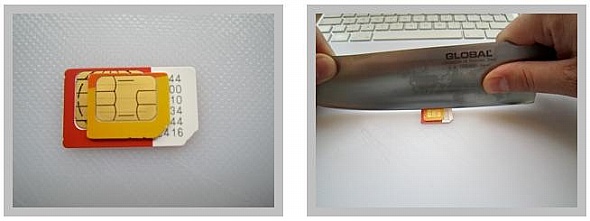
If you’ve ever had thoughts about asking your friend to get you an iPad 3G from the U.S. but are worried that you can’t use it because it runs on a micro SIM, then fret no more, because there’s now a guideline how to modify your own SIM card. It looks pretty simple, all you have to do is start cutting – you even have to cut the contacts on your original SIM card so it matches with a MicroSIM. Unfortunately though, if your friend is kind enough to ship over an iPad for you, you should probably ask for a MicroSIM as a sample. But be careful, last I heard, it costs quite a lot to replace a SIM card here in Malaysia, so please modify with care. Visit this site for the complete guideline.

01 May 2010

0 Xbox 360 120GB Elite

Product summary

The good: Excellent selection of games, including many 360-only exclusives; all games are in native high-definition; user-friendly Dashboard interface; supports wireless controllers and accessories; Xbox Live service offers online multiplayer (with matchmaking and voice chat) and content downloads for most games; backward compatible with many--but not all--original Xbox titles; doubles as a superior digital media hub and Windows Media extender; online Marketplace allows easy purchases of minigames, add-on gaming content, high-def movies, and TV shows.
The bad: The Elite fails to correct most of the annoyances of the original 360 version: the noisy DVD drive and cooling fan; a gigantic, oversize power supply; no built-in wireless networking; only three USB ports; a substandard DVD player; online gaming requires a paid subscription to Xbox Live; proprietary wireless format limits third-party accessories.
The bottom line: While it's neither a must-have upgrade for existing 360 owners nor as feature-packed as the PS3, the Xbox 360 Elite's combination of top-notch gaming and digital media features make it the current game console of choice.

27 April 2010

0 Black Berry Bold 9700

Product summary

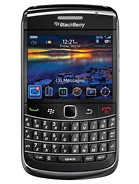
The good: The BlackBerry Bold 9700 boasts a sleeker design that includes an optical trackpad, a 3.5mm headphone jack, and a brilliant display. The smartphone is 3G capable and offers Wi-Fi with UMA support, Bluetooth, and GPS. It also gets a faster processor and updates to BlackBerry OS 5.0.

The bad: The BlackBerry browser doesn't compare to the competition. The handset's compact size results in a smaller display and keyboard, but they aren't deal-breakers.

The bottom line: The BlackBerry Bold 9700 have improves on its predecessor with a sleeker design and more power. We only wish it had a better browser to complete the package.

link 4 more info:
http://www.gsmarena.com/blackberry_bold_9700-2963.php
See The Promotion